
Allstate Health Solutions Walgreens Broker Program Frequently Asked Questions
Every link, step, and contact you need, all in one place. Bookmark this page and come back anytime.
your three tools
What is Connecteam, and how do I get in?
Connecteam is your home base for training videos, approved marketing materials to print, approved social posts, and the All-Agent Walgreens Chat. Open the text invite we sent to your phone and download the app. Once you're set up, you can use it on the app or in any web browser.
What do I use Sidebar Health for?
Use Sidebar Health to schedule and manage your shifts and check in at your preferred Walgreens stores. Log in from any web browser on your computer or phone.
What do I do in HubSpot?
Just look. You don't need to do any work inside HubSpot. Log in anytime to see your leads, including anyone who scanned your poster while you were away.
Continue using your preferred CRM and enrollment methods to manage your leads. For this program, HubSpot serves only as Allstate’s performance-tracking tool, not as a replacement for your existing process. Please use your QR code on you away poster to access the client intake form, and then complete the lead update form so your activity is recorded. This tracking also helps establish your eligibility for future program giveaways and incentives.
adding and updating leads
How do I add a new lead?
Scan the QR code on your away poster. You can fill out the form for your lead, or they can fill it out themselves. This adds the lead to HubSpot under your name. Every new lead starts here.
What happens if I skip the away poster form?
The lead won't be assigned to you, and your name, email, and phone number won't show up in their automated emails. Always start with your poster form.
If you've already skipped your away poster form, here are the steps to correct your lead:
- Scan the QR code on your away poster to open your lead intake form.
- Enter that lead's information again, using the same email address you used before.
- Once you submit it, the lead is assigned to you, and your contact info will show up in their emails.
How do I update a lead?
After a lead goes through your away poster form, use the lead update form to change their status, choose policy types, or send automated emails. You can update the same lead as many times as you need.
Update my Lead.
Can I use the lead update form for a brand-new lead?
No. New leads go through your poster form first. Then you can use the update form. The short version: Poster form to add. Update form to change. HubSpot to look.
Can I see the lead process from start to finish with screenshots?
Go to your lead intake form located on your away poster by scanning your QR code.
The form will look like this :
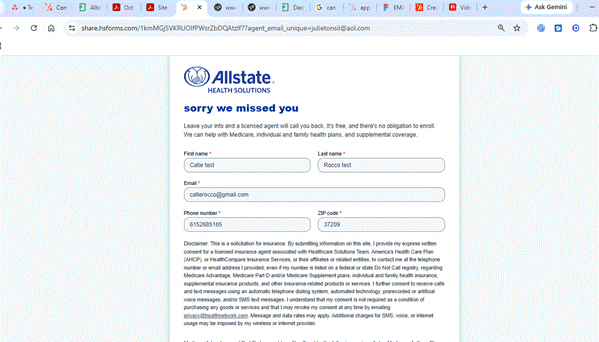
Then you’ll be able to login to HubSpot and see you have a contact assigned to you. Here the example after a test form submission that automatically assigned the correct agent as the owner:
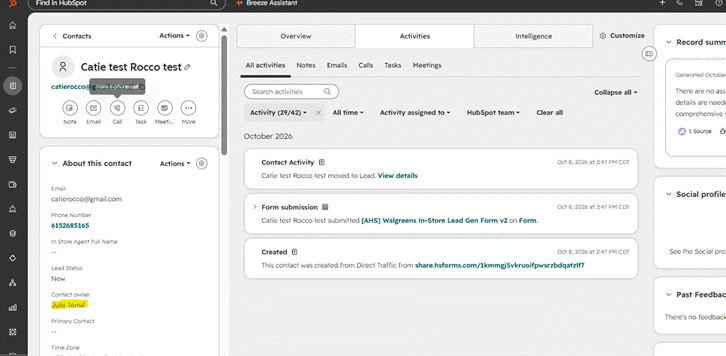
The next step is to update your lead. To send an automated email you go the lead update form.
Here is a test lead update form submission:
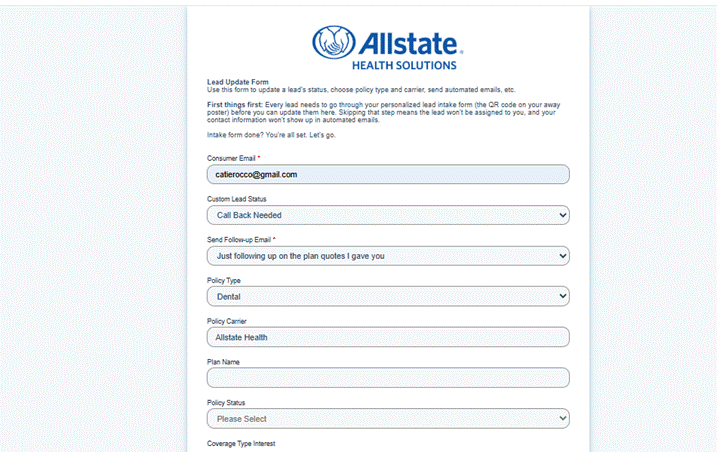
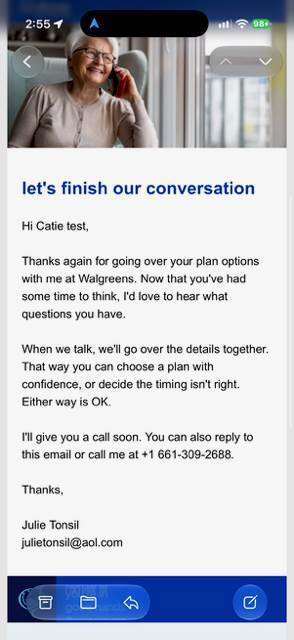
If the process is completed successfully, the lead should receive an email with your correct contact information.
How do I see my leads in HubSpot?
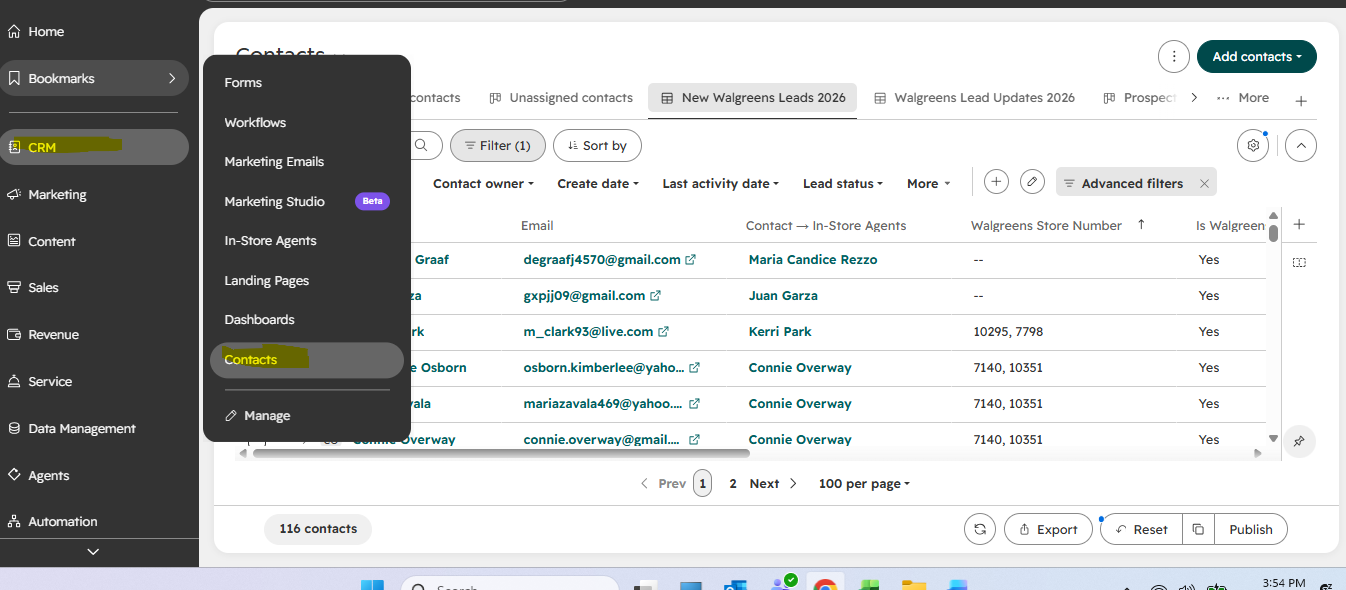
Log into HubSpot. Go to the CRM tab on the left panel, then click contacts.

marketing materials
When will my tablecloth arrive?
About one week after you complete your attestation form.
What size is the tablecloth?
The table cloth is fit for a 4’ by 2’ table.
Where do I find marketing materials and social posts?
These can be downloaded from the Marketing Materials folder in the Knowledge Base within Connecteam. Everything is there and ready to be printed.
Connecteam > Search > Knowledge Base > Marketing Materials
Can I edit the flyers or posters to fit my store?
Only your tri-fold brochure with your agent information. For all other marketing materials, compliance has approved every piece as is, so please print it without changes.
Where are my Kenvue sample kits?
If you have ordered these kits from Sidebar Health, you will receive shipping confirmation and tracking emails when the they ship.
support
Who do I contact about HubSpot help?
Email Caitlin.rocco@allstate.com for help with your HubSpot login, activation, or lead forms.
Who do I contact about everything else?
Email AllstateWalgreensBrokerProgram@allstate.com for questions about Connecteam, Sidebar Health, your Walgreens store, or anything else about the program.
What's the fastest way to get help?
Post in the Connecteam All-Agent Chat. Our team answers questions there, and your fellow agents can jump in, too. It's your best bet on nights and weekends.
I never got my HubSpot activation link. What do I do?
Email Caitlin.rocco@allstate.com and we'll send a new one.
I can't find my Connecteam text invite.
Email AllstateWalgreensBrokerProgram@allstate.com and we'll get you set up.
Can I change my associated email for HubSpot?
No, you can not. The program is already underway and your away poster signs and QR codes are associated with the email address you used to sign up for the program. If you need hep getting back into your HubSpot account, or need a password reset link, please email caitlin.rocco@allstate.com
How do I remove 2FA from my HubSpot account?
- Go to the settings icon (gear) in the top navigation bar.
- In the left sidebar menu, go to General > Security.
- Under the Two-factor authentication section, click Remove next to your primary and secondary methods.
- Click Turn off in the confirmation dialog box.
What do I do if I'm locked out of HubSpot?
If you cannot access your 2FA method, backup codes, or passkeys, you must request an authentication reset:
- On the HubSpot login screen, enter your credentials.
- On the 2FA verification page, click Reset authentication device (or "Lost your authentication device").
- Choose Request admin recovery to notify Catie Rocco.
- You will receive an email containing a verification code. Share this code privately with caitlin.rocco@allstate.com, who must complete the reset.
